How to Check If ChatGPT Recommends Your Brand
You cannot fix what you cannot see. Here is a practical, repeatable way to audit how your brand shows up when a buyer asks an AI about your category.
1. Write the questions buyers actually ask
Forget your brand name for a moment. Write the questions a buyer asks before they have chosen anyone: "best [category]", "[competitor] alternatives", "is [brand] worth it", "[brand] vs [competitor]", "problems with [brand]". These buyer-intent prompts are where the recommendation is won or lost.
2. Ask every engine, not just ChatGPT
Run each prompt through ChatGPT, Perplexity, Gemini and Google AI Overviews. They retrieve from different sources and disagree more than you would expect. For each, note whether you are recommended, ignored, or whether a competitor is preferred — and copy any sources the answer cites.
3. Run it more than once
AI answers are non-deterministic. The same prompt can name a different winner on a second run. Run each prompt three to five times and look at the pattern, not a single screenshot, so your conclusions are defensible.
4. Attribute every negative
When an answer says something negative or pushes a competitor, find the source behind it — a Reddit thread, a Trustpilot review, a competitor comparison page, or your own outdated content. That source list is your fix plan.
5. Make it continuous
AI answers drift as the web and models change. A one-time check is a snapshot; the value is in re-running monthly (or letting a tool monitor weekly) so you catch a new negative before it spreads across engines.
Shortcut
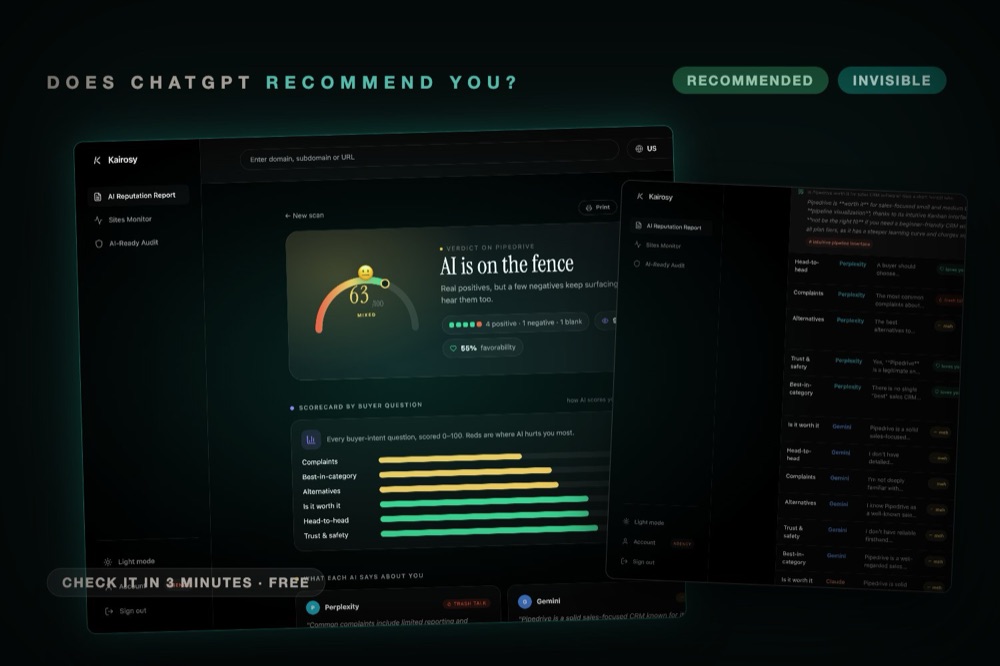
Kairosy automates all five steps — generates the prompts, runs every engine, classifies each mention, and traces the negatives to their source — so you get the answer in about 30 seconds instead of an afternoon of copy-pasting.
See what AI says about your brand
Run a free scan across ChatGPT, Gemini, Claude & Perplexity in about 30 seconds.
Run my free scan